
Home › Guides › Make a video resume on your phone
How to Make a Video Resume on Your Phone (in 10 Minutes)
You don’t need a camera, a studio, or editing software. Your phone, a window, and a quiet room are enough. Here’s how to make a good video resume in about 10 minutes.
1. Set up (2 minutes)
- Quiet room. Phone on silent. Turn off fans or AC if they hum. Turn off the TV.
- Face the light. Put a window or lamp in front of you, never behind you. Light behind you turns you into a shadow.
- Tidy background. A plain wall or a neat room. Nothing distracting behind your head.
- Eye level. Prop the phone on books or a shelf so the lens is level with your eyes. Looking down into a phone isn’t a good angle for anyone.
- Hold it upright (portrait). Seenly shows your video in a tall, phone-shaped frame, so vertical fills it best.
- Frame head and shoulders, with a little space above your head.
2. Know what you’ll say (3 minutes)
Don’t wing it. Seenly gives you five prompts as a script for one video:
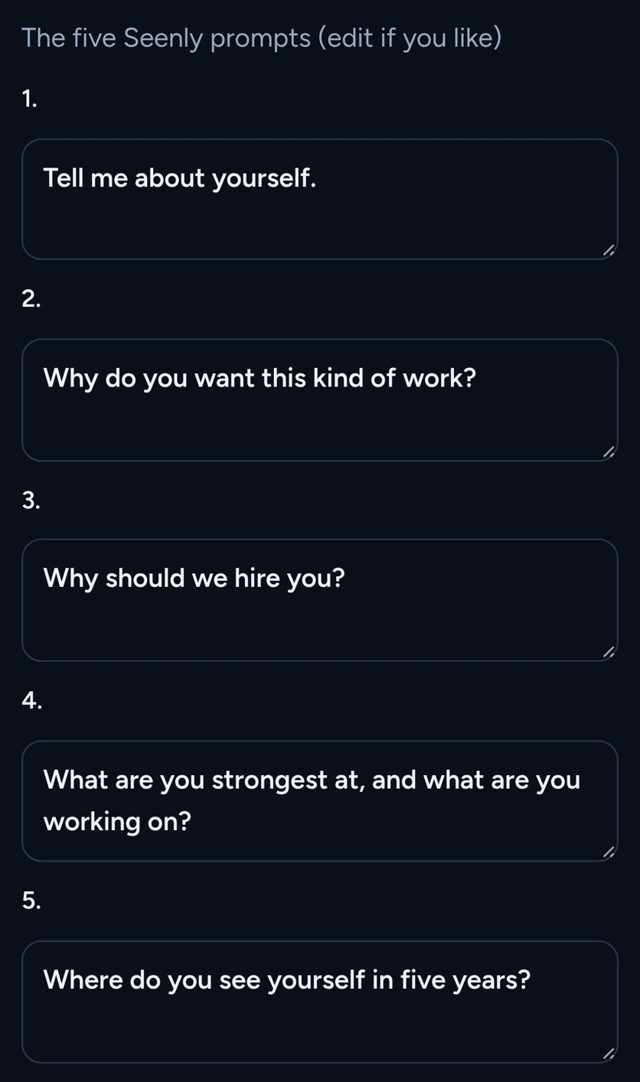
About 15 seconds per prompt gets you to 60–90 seconds. For example lines and a copy-paste script, see what to say in a video resume.
Want it written for you? Seenly’s script page asks a few questions and writes a 60–120 second script you can read with a built-in teleprompter.
3. Record (3 minutes)
- Do a 10-second test first. Play it back. Check the light, sound, and framing.
- Look at the lens, not at yourself on the screen.
- Smile before you start talking and pause a beat at the end.
- Aim for 60–90 seconds. Seenly’s limit is 2 minutes.
- One take is fine. If you trip up, start over. No editing needed.
4. Put it in Seenly and share (2 minutes)
- Sign up with Google or email.
- Build your draft: photo, name, city, the job titles you want, and the five prompts.
- Add one video. Record it right on the page or upload it from Photos (.mp4 or .mov). Aim for 60–90 seconds; the limit is 2 minutes.
- Go live when you’re ready. Seenly Pro is $7.99/month with a 7-day free trial. Going live gives you a public link like
seenly.live/u/your-name, share buttons, and a pin on the talent map. Until then your draft stays free and unlisted, and no card is needed.
You can record right in Seenly or upload a clip you already shot from your Photos. Big files upload in pieces, so keep the tab open until it finishes.
Common mistakes
- Window behind you. Turn around so the light is on your face.
- Too long. Past two minutes, people stop watching. Cut to what matters.
- Reading word for word. Use the script to practice, then talk. If you use the teleprompter, slow it down.
- Holding the phone. It shakes. Prop it up.
- Looking at the screen. On camera, it looks like you’re looking down.
- Background noise. TV, dogs, kids, traffic. Pick the quietest room and time.
- A weak first line. Start with your name and the job you want. Skip “Um, so, hi.”
FAQ
Front or back camera?
The front camera is fine and lets you check your framing. The back camera is often sharper, so if you use it, do a test shot first to check framing.
Do I need a microphone?
Usually not. In a quiet room the phone’s mic is fine. Sit close to the phone, about arm’s length, and avoid rooms that echo.
Vertical or horizontal?
Vertical (portrait). Seenly shows your video in a tall, phone-shaped frame.
How long should a video resume be?
60 to 90 seconds. Seenly takes one video up to 2 minutes.
Can I upload a video I already recorded?
Yes. Seenly takes .mp4 or .mov files from your Photos, or you can record right on the page.